This article contains details on validating the origin and integrity of the latest version of Nova
Nova 14.1 Checksum
The SHA256 checksum of the Nova 14.1.zip archive, available at https://download.panic.com/nova/Nova 14.1.zip is:
80d090495a4b43b78e8558ddc161fd30adafdac287b7a8cafdd9c7fd9cc9940f
Validating the Checksum
- Download Nova 14.1.zip
- Run the following command in Terminal to compute the checksum of your copy:
$ shasum -a 256 ~/Downloads/Nova\ 14.1.zip
If the hash portion of the command output matches the checksum above:
80d090495a4b43b78e8558ddc161fd30adafdac287b7a8cafdd9c7fd9cc9940f /Users/panic/Downloads/Nova 14.1.zip
you can be sure that your copy of the download is identical to the version on our website.
Unfortunately, validating the checksum alone does not guarantee that the contents of Nova 14.1.zip haven’t changed since we posted it*. However, with one extra step you can also determine with certainty that the checksum above, and therefore the contents of the ZIP, originated from Panic.
*Why not? In the very unlikely circumstance that a malicious actor replaced the ZIP archive on our website and modified the contents of this article using a new SHA256 hash, the checksum could still validate.
Nova 14.1 Checksum Signature
Using our public key, we have PGP-signed the SHA256 checksum from above:
-----BEGIN PGP SIGNED MESSAGE-----
Hash: SHA512

80d090495a4b43b78e8558ddc161fd30adafdac287b7a8cafdd9c7fd9cc9940f
-----BEGIN PGP SIGNATURE-----

iQEzBAEBCgAdFiEE6i1R0iW3pPNCW77Iq26O7ibMLj0FAmpzwPIACgkQq26O7ibM
Lj1nlwf/T1XKNvzsJs67QOSZO9dGaa4IDuJw+WT/sEap6LghDzWxIOOQsVt4gm3o
sydAGfjtSMMehG5WL1njfF9HQ6iFd0XHOGylhPaUpWpBkpOd7gDeEh1CTOIxW+Zo
hkbjnW1LOhXdGmj4/+7RcBxCMIzEnVM0fKSV45VKELQPFmSZZAMcWGX+PO8m2lW3
fL8Xz1ho+Y4XPk2i1deDTZY6H8oRHoDeXXB4tY2Jbo7HWpgzjA+3whEqbkbL0405
VyybOrJFR9V5ha/m8hq0wiRyf4iFaLuAAL3bKg7tVNCqBq1rPdaINeRkkNSU9FM/
BuW2ymi0JYDRz6ZpG84szV3R705eiA==
=cm77
-----END PGP SIGNATURE-----
Validating the Signature
- Follow these instructions to install GnuPG
- Open your terminal
- Import Panic’s public key using
gpg --import - Copy the entire PGP message above, including
-----BEGIN PGP MESSAGE-----and-----END PGP MESSAGE----- - Use the
echo "<message" | gpg --verify -command to verify the PGP message copied above
Most importantly, GnuPG should indicate that the message was signed by Panic:
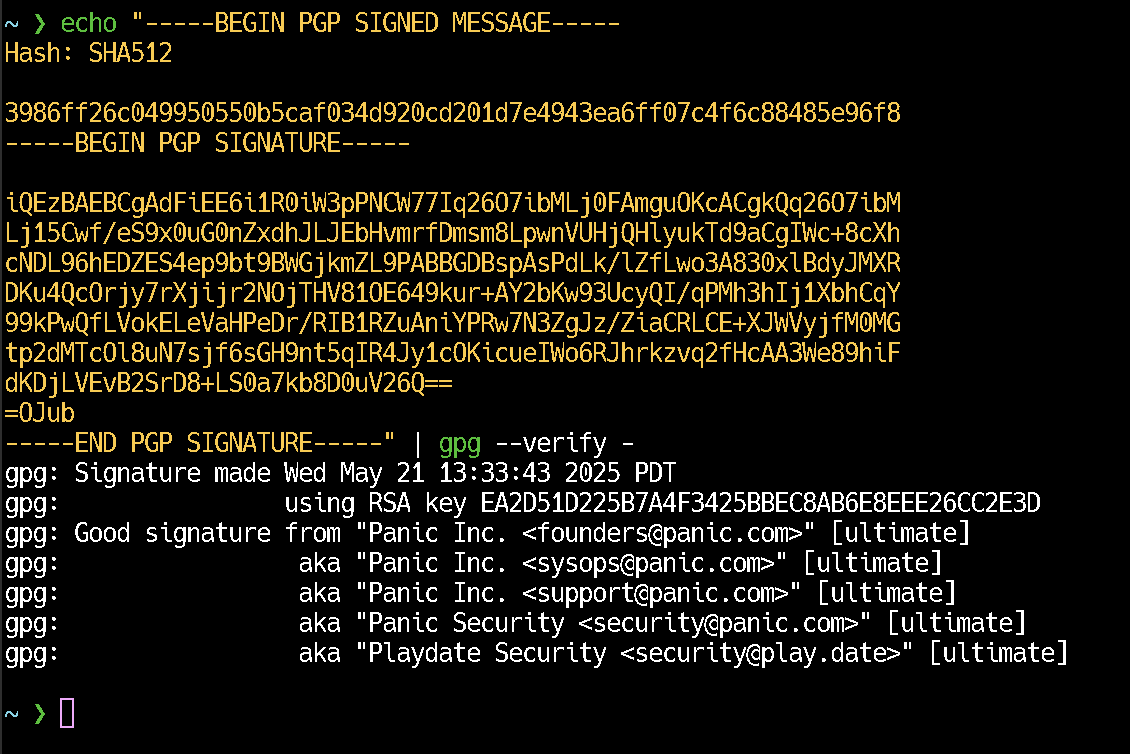
Additionally, the resulting Signed Text should match our original checksum:
80d090495a4b43b78e8558ddc161fd30adafdac287b7a8cafdd9c7fd9cc9940f
If both items match, you can be sure that the checksum in this article originated from Panic.
Putting it all together
By using two factors of validation:
- A checksum which ensures that your copy of
Nova 14.1.zipis identical to the copy on our website - A PGP signature which ensures that the checksum originated from Panic
you can be sure that you are installing the release that we originally posted.
Support
We are more than happy to answer questions or help provide any guidance you might need to validate the checksum and signature for this release. Please email us, nova@panic.com.